Next.js product sites that search engines can actually read
A checklist for shipping Next.js marketing and product pages that crawlers can parse: server-rendered HTML, metadata, canonicals, sitemaps, and structured data.
Azeem Subhani · · 4 min read
A product site can look great and still be close to invisible to search. Most of the time the cause isn't the content. It's how the HTML reaches the crawler.
This is the checklist I use on Next.js web projects. Every example below is real code from this site, including one bug I shipped to myself while building the blog you're reading.
What a crawler should get
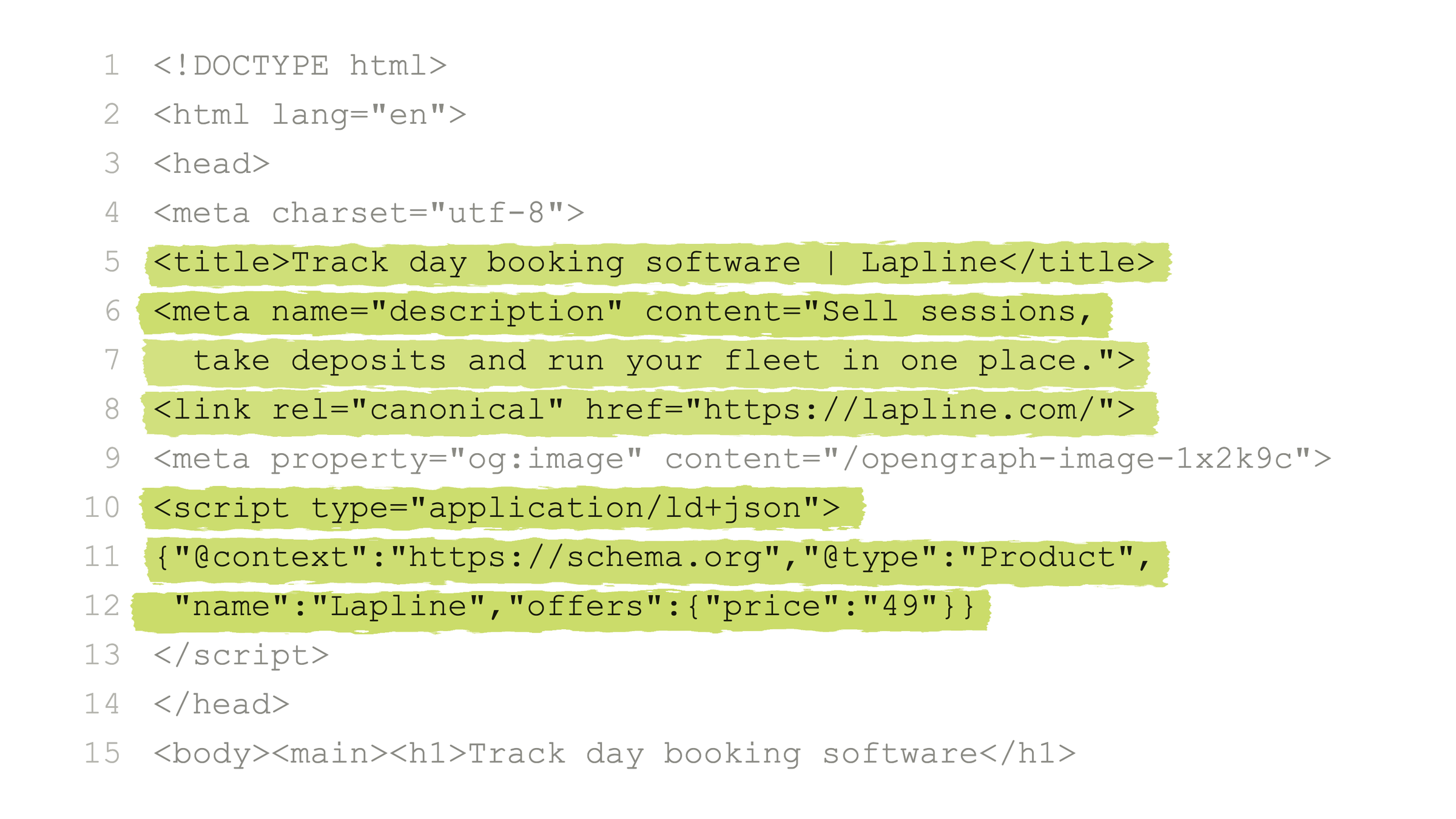
The goal is simple to state: the first HTML response for every page already contains everything a search engine needs. That means the title, description, canonical URL, share tags, structured data, and the content itself. No JavaScript has to run first.
Search engines can run JavaScript, but rendering is a second, slower pass. Some crawlers and most link-preview bots skip it entirely. If your content only appears after hydration, you're relying on the slow pass to see it at all.
1. Ship real HTML
In the App Router, Server Components render on the server by default. That default is the single biggest SEO feature Next.js gives you, and it's easy to give away:
- Keep
"use client"for the interactive pieces, such as a menu, a form, or a theme toggle. Don't put it on whole pages. - Don't fetch the page's main content in the browser with
useEffect. Read it on the server. - Prefer static generation for pages that don't change per request. Every page on this site, blog posts included, is prerendered at build time.
For dynamic routes, generateStaticParams lists every page up front, and dynamicParams = false makes unknown slugs a real 404:
// src/app/(site)/blog/[slug]/page.tsx
export const dynamicParams = false;

export function generateStaticParams() {
  return posts.map((post) => ({ slug: post.slug }));
}
2. One title and description per page
Set the brand once, in the root layout, with a title template and metadataBase:
// src/app/layout.tsx (trimmed)
export const metadata: Metadata = {
  metadataBase: new URL(profile.siteUrl),
  title: {
    default: `${profile.name} | Full-Stack & AI Application Engineer`,
    template: `%s | ${profile.name}`,
  },
  alternates: { canonical: "/" },
};
Then each page exports its own metadata, and the template adds the suffix:
// src/app/privacy/page.tsx
export const metadata: Metadata = {
  title: "Privacy policy", // rendered as "Privacy policy | Azeem Subhani"
  description: `Privacy policy for ${profile.name}'s portfolio website and contact form.`,
  alternates: { canonical: "/privacy" },
};
Dynamic pages use generateMetadata, which reads the same data as the page. For posts, that includes article tags and a noindex for drafts, so a draft can be reviewed in production without being indexed:
// src/app/(site)/blog/[slug]/page.tsx (trimmed)
export async function generateMetadata({ params }: Props): Promise<Metadata> {
  const post = getPost((await params).slug);
  if (!post) return {};

  return {
    title: post.title,
    description: post.description,
    alternates: { canonical: blogPath(post.slug) },
    ...(post.draft ? { robots: { index: false, follow: true } } : {}),
    openGraph: {
      type: "article",
      publishedTime: post.publishedAt,
      tags: post.tags,
    },
  };
}
3. Canonical URLs
With metadataBase set once, every page can give a relative canonical and Next.js resolves it to an absolute URL. That one line per page means tracking parameters, trailing-slash variants, and preview deployments all point search engines back to one URL, so ranking signals don't get split across duplicates.
4. A sitemap built from your content
Don't maintain sitemap.xml by hand. Generate it from the same data that builds the pages, so a new project, service, or post appears without anyone remembering to add it. Leave out anything you've marked noindex. A sitemap that lists pages you've told Google not to index sends mixed signals.
// src/app/sitemap.ts (blog section, trimmed)
const blogRoutes: MetadataRoute.Sitemap = hasPublishedPosts
  ? [
      { url: `${profile.siteUrl}/blog`, changeFrequency: "weekly", priority: 0.6 },
      ...publishedPosts.map((post) => ({
        url: `${profile.siteUrl}${blogPath(post.slug)}`,
        lastModified: post.updatedAt ?? post.publishedAt,
      })),
    ]
  : [];
robots.ts then points crawlers at it:
// src/app/robots.ts
export default function robots(): MetadataRoute.Robots {
  return {
    rules: { userAgent: "*", allow: "/" },
    sitemap: `${profile.siteUrl}/sitemap.xml`,
  };
}
5. Share images that actually load
Add an opengraph-image.tsx next to a route, and Next.js generates a 1200×630 card for it at build time. This is the card this post gets when someone shares it:

Here's the bug I promised. My first version of the post metadata also listed the image by hand, using the path that seemed obvious:
// Don't do this
openGraph: {
  images: [{ url: `${url}/opengraph-image` }],
},
The production build told a different story. Next.js serves dynamic share images at a hashed path, and a hand-written images entry overrides the one the file convention would have added. Every post was advertising an image that returned 404:
The fix was to delete code: remove images from the metadata and let the file convention emit og:image and twitter:image itself. The lesson generalizes, though. Check rendered tags against a production build, and request every URL they contain. A page can pass every type check and still advertise a broken image to every chat app it's pasted into.
6. Structured data where it fits
JSON-LD tells search engines what a page is: an article, a person, a product. For a post, a BlogPosting with the headline, dates, and author is enough. One detail matters a lot: escape < when you inline it, so no content can ever close the script tag early.
// src/app/(site)/blog/[slug]/page.tsx (trimmed)
const jsonLd = {
  "@context": "https://schema.org",
  "@type": "BlogPosting",
  headline: post.title,
  datePublished: post.publishedAt,
  author: { "@type": "Person", name: profile.name, url: profile.siteUrl },
};

<script
  type="application/ld+json"
  dangerouslySetInnerHTML={{ __html: JSON.stringify(jsonLd).replace(/</g, "\\u003c") }}
/>;
7. Keep it fast
Core Web Vitals are a ranking signal, and they matter even more to the people who land on your page. On this site that's meant deferring offscreen work, shrinking the images and video it ships, and preloading only the one font the first screen needs. On this blog, code highlighting runs at build time, so posts ship no highlighter to the browser.
The short version
- Render on the server, and prerender what you can.
- Give every page its own title, description, and canonical.
- Generate the sitemap from your content, and leave out anything you've marked
noindex. - Let the file conventions produce share images, and verify every URL in a production build.
- Add structured data, safely escaped.
None of it is clever. Most sites skip at least one item, and the ones that skip none have an edge that compounds.
Need a product site that search can read? Get in touch.
Written by
Azeem Subhani
Senior Full-Stack & AI Application Engineer
I build SaaS, booking, payment, real-time, and AI-enabled web platforms with React, Next.js, Node.js, NestJS, Django, PostgreSQL, and AWS. My work includes Stripe payment systems, white-label booking flows, real-time collaboration, RAG workflows, and developer automation.