Next.js Stale Cache Serving the Wrong User: Find the Layer
Logged-in users see another account's data, or stay stale after revalidation. Map the symptom to the Next.js 16 cache layer and invalidate the right one.
Azeem Subhani · · 11 min read
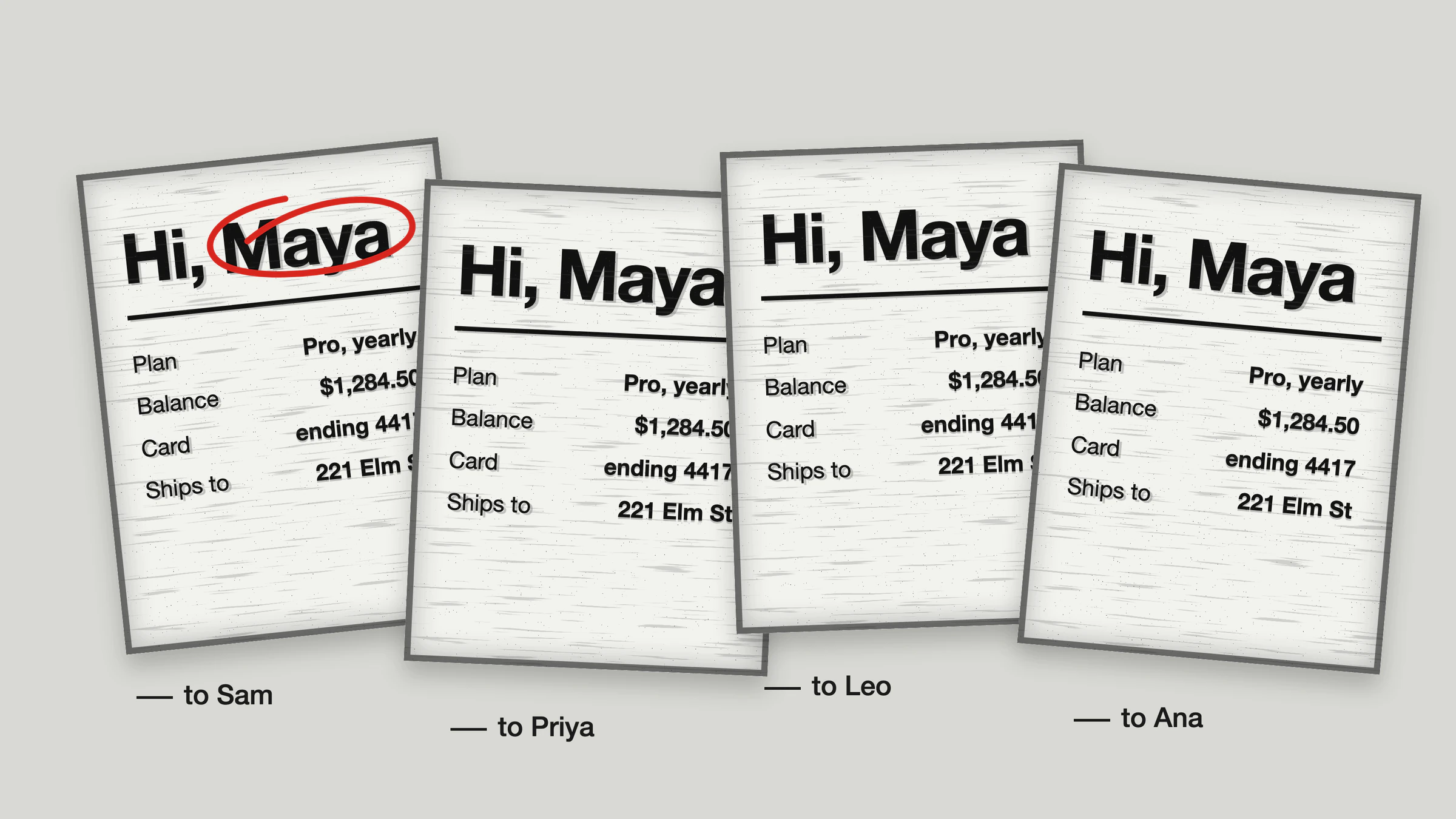
Two reports arrive in the same week. A logged-in user opens a dashboard and sees another account's numbers. Separately, an editor saves a change, your server logs show the revalidation ran, and the page in their browser still shows the old content when they click back to it. The Next.js stale cache problem has two faces, wrong data for the wrong viewer and right data that arrives late, and the instinct in both cases is to clear "the cache." There is no single cache to clear. The App Router stacks several, they live in different places, and an invalidation call reaches only some of them.
This article describes the mechanisms as of Next.js 16 (the 16.3 documentation, fetched in October 2026, checked against the 16.3.3 package). Caching behavior has changed across major versions, so older guides, including the Next.js 14 caching page that many articles still cite, can describe different defaults. Re-check the docs for your exact version before changing production behavior.
Two caching models in Next.js 16
Next.js 16 documents two models, selected by one flag.
- Cache Components, enabled with
cacheComponents: truein the Next config. Data is dynamic by default, and you opt specific functions or components into caching with theuse cachedirective. The Caching guide covers this model. - The previous model, for projects that do not enable that flag. The previous-model guide covers
fetchoptions,unstable_cache, and route segment config. In the type definitions shipped in the 16.3.3 package, thecacheComponentsdefault is false, so an upgraded project that never set the flag is still on this model.
Find out which one you are on first. Search next.config.ts for cacheComponents. Every diagnosis below depends on the answer, because the same symptom has different causes in each model.
Which Next.js cache is serving stale data
The docs describe the layers by mechanism. Older material gave them names such as Data Cache and Full Route Cache; the 16.3 pages cited here do not use those names, so this article sticks to what the current docs say.
- Request memoization.
fetchrequests using GET with the same URL and options are memoized during a single server render pass, per the fetch reference. It lasts only for that render, so it cannot serve one user's data to another request. Rule it out early. - Persistent server caches. In the previous model,
fetchwithcache: 'force-cache',fetchwithnext.revalidateornext.tags, andunstable_cachepersist across requests. In Cache Components, ause cacheentry is stored by a cache handler, in memory by default, and lasts until it revalidates. - Prerendered output. Routes without request-time dependencies are rendered ahead of time. With Cache Components, the result is a static shell plus streamed dynamic parts.
- The client cache. The glossary describes an in-memory cache in the browser holding RSC payloads for visited and prefetched routes. It is cleared on a page refresh.
A fifth place is easy to forget: a CDN in front of the app. The CDN caching guide states that revalidateTag() and revalidatePath() invalidate the Next.js server cache but not the CDN, which keeps serving its copy until the s-maxage TTL expires unless you also purge it. The same guide explains that RSC requests depend on a forwarded rsc header, Vary headers, and the _rsc search parameter in the cache key, so a CDN that strips them can return the wrong representation.
Symptom to layer
Use the symptom to pick the layer, then confirm with the diagnosis steps in the next section.
- User A sees user B's data, on first load. Suspect a persistent server cache keyed too coarsely, or a prerendered route that was supposed to be per-user. Not the client cache: the client cache is in the browser of whoever made the request, so it cannot show someone else's data.
- A logged-in page shows anonymous or empty content in production but works in dev. Suspect static rendering. Development renders pages on demand and never caches them, so the problem appears only in a production build. In the previous model,
dynamic = 'force-static'forcescookies(),headers(), anduseSearchParams()to return empty values, which is exactly what a personalized page looks like after being forced static. - Server logs show the revalidation, a hard refresh shows new data, normal navigation shows old data. The client cache. A refresh clears it; ordinary navigation reuses it.
- Revalidation ran but a reload still shows old data. A server cache that was not the one you invalidated: a different tag, a path instead of a tag, or an entry on another instance.
- Server logs show the revalidation, but a hard refresh through a CDN still shows old data. The CDN copy. Purge it alongside the revalidation call.
- Data is stale only on some instances or only after a deploy. In-memory entries are per instance, and the docs state that entries do not carry over to a new deploy because the cache key includes the build ID.
- One field is stale while the rest of the page is fresh. A nested cached scope with its own lifetime, or a second function that reads the same data but carries a different tag.
Diagnosis procedure
- Reproduce on a production build. Run
next buildandnext start, not the dev server. The dev server renders pages on demand, which hides most of these bugs. - Test with two accounts in two browser profiles. Load the page as user A, then as user B, without clearing anything between them. If B sees A's data, the cache is shared on the server.
- Separate server from client. Hard refresh the stale page. If fresh data appears, the client cache was serving it. If not, the server returned stale data.
- Turn on cache logging. The
use cachedocs documentNEXT_PRIVATE_DEBUG_CACHE=1for verbose cache logging, in dev and when started in production mode. - Inspect the stale time the server sends. The
cacheLifereference says the server communicates the client's stale time with thex-nextjs-stale-timeresponse header. Look at it on the navigation request. - List every reader of the data. For each function that returns the stale value, write down what caches it, which tags it carries, and whether any argument identifies the viewer.
- Check the invalidation call site. Server Action, Route Handler, or webhook? That decides which APIs are available and whether the viewer's browser is told anything.
Fixing a Next.js cache that serves the wrong user
Treat the request as a cache boundary. Anything derived from cookies, headers, or the session is per-viewer, and the safest default is that it is never cached in a store that other viewers read.
With Cache Components
The docs state that cached functions and components cannot call cookies(), headers(), or read searchParams; you read them outside and pass values in. Arguments and captured variables become part of the cache key. That gives you a pattern that works and a pattern that leaks.
// Illustrative. Requires cacheComponents: true.
import { cookies } from 'next/headers';
import { Suspense } from 'react';
import { cacheLife, cacheTag } from 'next/cache';

// Shared, public data: same for everyone, safe to cache and share.
async function PublicPricing() {
  'use cache';
  cacheLife('hours');
  cacheTag('pricing');
  return <Pricing rows={await db.pricing.findMany()} />;
}

// Per-viewer data: read the session outside the cached scope.
async function AccountPanel() {
  const sessionId = (await cookies()).get('session')?.value;
  if (!sessionId) return <SignInPrompt />;
  // Resolve the user id on the server from the session, not from client input.
  const userId = await resolveUserId(sessionId);
  return <CachedAccount userId={userId} />;
}

async function CachedAccount({ userId }: { userId: string }) {
  'use cache';
  cacheLife('minutes');
  // Per-user tag so one user's write only invalidates that user's entry.
  cacheTag(`account-${userId}`);
  return <Account data={await db.accounts.findUnique({ where: { id: userId } })} />;
}

export default function Page() {
  return (
    <>
      <PublicPricing />
      {/* Runtime-dependent content streams behind a Suspense boundary. */}
      <Suspense fallback={<p>Loading account...</p>}>
        <AccountPanel />
      </Suspense>
    </>
  );
}
Here the cache key for CachedAccount includes userId, so two users get two entries. The leak pattern is passing a coarser value, such as a role, plan name, or tenant flag, as the only argument to a function that returns per-user data. All users with the same role then share one entry. Review every use cache function that touches personal data and ask what, exactly, differentiates its key.
The docs also describe use cache: private, which allows runtime APIs inside the cached scope. Matching calls within one request can reuse a result, but Next.js does not store it in a server cache across requests; the client router can keep the output in browser memory for the configured stale time. It fits cases where request-specific data must stay out of server caches that persist across requests, or where refactoring to pass arguments is impractical.
The docs note that a cached component gated behind request data is held in memory by default, which on serverless may not persist across requests, so it can re-run each time. That is a performance fact, not a safety net: do not rely on an entry being short-lived to protect personal data.
With the previous model
Make the personalized subtree dynamic. The dynamic = 'force-dynamic' setting forces per-request rendering and behaves like setting every fetch in that layout or page to no-store.
// Illustrative. Previous model (cacheComponents not enabled).
// app/(private)/layout.tsx : applies to everything under this group.
export const dynamic = 'force-dynamic';

export default function PrivateLayout({ children }: { children: React.ReactNode }) {
  return <>{children}</>;
}
Keep public pages in a separate route group with no such setting so they stay cacheable. Splitting the tree is better than sprinkling no-store on individual calls, because one forgotten call is enough to leak.
Three previous-model settings deserve a review. The fetch reference says caching is opt-in, that force-cache applies to any request including those that send authorization or cookie headers, and that a match uses the URL, method, headers, and body. So per-user headers produce separate entries, but the response is still stored in a server cache that outlives the request, and a shared service credential in the header collapses every user into one entry. Next, fetchCache = 'default-cache' is documented as making even fetch requests made after request-time APIs count as static. Finally, for unstable_cache, the docs describe the array argument as a cache key prefix; verify with a two-account test that the user identifier is part of the key, either as a function argument or in the key parts.
Fixing stale data after a mutation
The right call depends on where the invalidation runs and what the user must see next. Per the revalidateTag and updateTag references:
- updateTag works only in Server Actions. It expires the tag immediately, so the next request waits for fresh data. It is built for read-your-own-writes: the user saves, then sees the result.
- revalidateTag with the max profile marks the tag stale and serves stale content while it revalidates in the background. It works in Server Actions and Route Handlers. Calling it with one argument is deprecated.
- revalidateTag with an expire of 0 serves no stale content, and is the documented option when the invalidation comes from a webhook or another service that cannot use
updateTag. - refresh refreshes the client router from a Server Action.
- revalidatePath invalidates by route, and the docs note that tag and path calls may need to be used together.
// Illustrative Server Action. Requires 'use server' semantics.
'use server';

import { updateTag, refresh } from 'next/cache';

export async function saveProfile(formData: FormData) {
  const userId = await requireUserId(); // authenticate on the server
  await db.profiles.update({ where: { id: userId }, data: parse(formData) });

  // Immediate expiry: the next read of this user's entry fetches fresh data.
  updateTag(`account-${userId}`);
  // Also refresh the client router for uncached parts of the current view.
  refresh();
}
Per the cacheLife reference, when a revalidation function runs from a Server Action, the entire client cache is cleared immediately, bypassing the stale time. This is why a mutation in your own session usually looks right.
The case that stays stale
A GitHub discussion reports Next.js 15.5.2 with tagged, force-cached fetches and a revalidation endpoint. Some pages showed updated titles after navigation and others did not, until roughly the default client cache period passed or the user refreshed. Responders attributed it to two layers: the server cache was invalidated correctly, while the browser's in-memory router cache kept serving the old payload. Their suggestions were lowering the static stale time and calling router.refresh() after mutations. The discussion was unresolved in the original post, and it describes 15.5.2, not 16.
The 16 docs add a relevant detail: the client cache is cleared when revalidation runs in a Server Action in that session. A change made by someone else, or by a webhook or Route Handler, cannot clear a different person's open tab. That is an inference from how the docs describe the clearing, so test it. The levers that remain are the client stale time and an explicit refresh.
The staleTimes setting is documented as experimental and not recommended for production, with defaults of 0 seconds for dynamic pages and 5 minutes for static pages and prefetched links. With Cache Components, the docs recommend the stale value of cacheLife per function or route, and say a minimum of 30 seconds is enforced. Pick the lowest stale time whose cost you can afford on routes where freshness matters.
Trade-offs
- Turning caches off costs server work.
force-dynamicor uncached reads mean every request renders and queries. Time to first byte and database load rise. Contain the blast radius by splitting public and private trees. - A long client stale time feels instant and serves old data. Back-navigation and revisits skip the network. For prices, balances, and permissions, shorten it; for documentation, lengthen it.
- Fine-grained tags are correct and easy to forget. A per-user tag prevents over-invalidation but demands that every mutation path calls it. Add a test that exercises each write path and asserts the tag call.
- Immediate expiry trades speed for correctness.
updateTagand an expire of 0 make the next request wait; the max profile keeps responses fast but shows stale content briefly. - Remote caches add network hops and cost. The docs describe
use cache: remoteas a durable shared handler that pays off only at a high hit rate. - Per-user server entries store personal data. Check retention and compliance expectations before caching account data server-side, and see broken object level authorization for why the key must come from the verified session, never from a request parameter.
- Crawlers get a different path. The docs say bots are served a fully dynamic render instead of the static shell, so verify what a crawler receives separately from what a browser receives.
If the stale value follows a write to a database with replicas, the cause may be below Next.js entirely; see read-your-writes and replica lag.
Checklist for Monday
- Confirm whether
cacheComponentsis enabled. - List every cached function or
fetchthat touches user data and write down what is in its key. - Move session reads outside cached scopes and pass the verified user id in.
- Put private routes in their own group and make them dynamic.
- Replace one-argument
revalidateTagcalls withupdateTag, the max profile, or an expire of 0. - Test in a production build with two browser profiles, and again after a mutation from a second session.
- Decide the client stale time per route, not globally.
Sources
- Caching, Next.js docs (16.3): Cache Components model, runtime APIs, where cached content is stored, bots and crawlers.
- Caching and Revalidating (Previous Model), Next.js docs: fetch defaults,
unstable_cache,dynamicandfetchCachesettings. - use cache: private, Next.js docs: runtime APIs allowed, no cross-request server storage.
- fetch, Next.js docs: memoization lifetime,
force-cachematching rules. - Using a CDN with Next.js, Next.js docs: CDN not invalidated by revalidation calls,
rscand_rschandling. - Next.js glossary: client cache definition and invalidation triggers.
- use cache, Next.js docs: cache keys, runtime API restriction, in-memory behavior, debug logging.
- cacheLife, Next.js docs: client cache behavior, stale time minimum, client cache clearing on Server Action revalidation.
- revalidateTag, Next.js docs and updateTag, Next.js docs: invalidation semantics and where each can be called.
- staleTimes, Next.js docs: experimental status and defaults.
- Next.js discussion 86538: client router cache serving stale data after server revalidation (reported on 15.5.2).
Written by
Azeem Subhani
Senior Full-Stack & AI Application Engineer
I build SaaS, booking, payment, real-time, and AI-enabled web platforms with React, Next.js, Node.js, NestJS, Django, PostgreSQL, and AWS. My work includes Stripe payment systems, white-label booking flows, real-time collaboration, RAG workflows, and developer automation.