Read Replica Stale Reads: Read-Your-Writes Routing for Postgres Lag
The user saved and saw old data. Prove replica lag with a WAL timeline, classify reads, and route read-your-writes without overloading the primary.
Azeem Subhani · · 11 min read
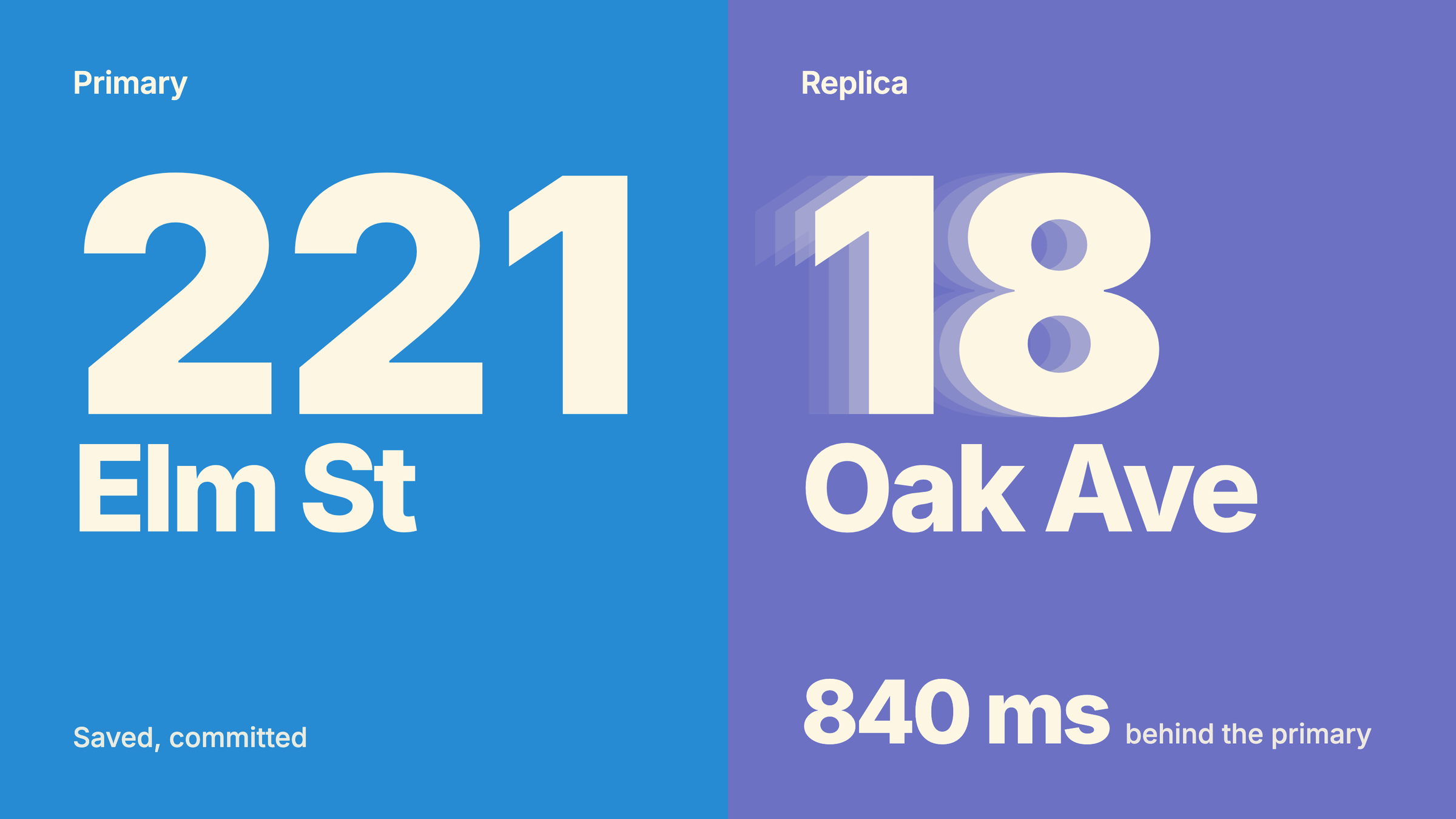
A user changes their shipping address, clicks save, gets a success toast, and the page that loads next shows the old address. They refresh and it is correct. Support files it as "save is flaky," an engineer checks the write path, finds the row committed on the primary, and concludes the bug must be in the frontend or a cache. Often it is neither. The write went to the primary and the next read went to a read replica that had not applied it yet. That is a stale read from replica lag, and asynchronous replication is doing exactly what it is documented to do. The bug is the routing: a read that needed to see the user's own write was sent somewhere that could not promise it. This post shows how to prove that, how to classify reads, and how to get read-your-writes behavior without sending every query back to the primary.
Why a read replica returns stale data after a write
PostgreSQL streaming replication is asynchronous by default. The documentation says plainly that a committed change on the primary becomes visible on the standby after a small delay, typically under one second, provided the standby can keep up with the load (PostgreSQL log-shipping standby servers). Managed services work the same way. Amazon RDS uses the engine's asynchronous replication method to update a read replica whenever the primary changes (RDS read replicas).
Under one second sounds harmless until you notice that a save followed by a redirect and a page render often takes less than that. Any non-zero lag is a window in which "save, then read" can return the old row.
The window also grows, and it grows without errors. One documented cause sits on the replica itself. When a query running on a hot standby conflicts with WAL that is about to be applied, the standby can wait before canceling that query. max_standby_streaming_delay controls how long, and its default is 30 seconds. It is the maximum total time allowed to apply WAL data once received from the primary, not a per-query timeout (PostgreSQL replication settings). A long analytics query on the same replica that serves your app can hold replay back for tens of seconds. During that time every user who saves and then reads sees old data, and nothing in your error logs says so.
The same lag has a second, worse meaning. If the primary fails and you promote an asynchronous replica, the PostgreSQL docs state that the data you lose is proportional to the replication delay at the moment of failover (PostgreSQL log-shipping standby servers). Writes the user saw succeed can disappear. Treat replica lag as both a correctness signal for reads and a data-loss budget for failover.
Prove it with a timeline
Before changing routing, confirm the read actually hit a replica that was behind. You want three facts for the failing request: where the write committed, which server served the read, and how far that server had replayed.
- Log the commit position on the primary. After the write commits, record
pg_current_wal_insert_lsn()together with the request id. The PostgreSQL WAIT command docs use exactly this function to capture the position to wait for. - Log which server served the next read. Record the host, or the result of
pg_is_in_recovery(), which is true on a standby (PostgreSQL admin functions). - Log the replica's replay position at read time.
pg_last_wal_replay_lsn()returns the last WAL location the standby has replayed, and it increases monotonically while recovery is in progress (PostgreSQL admin functions). - Compare. If the replay position is behind the commit position, the replica had not applied the write when it answered.
pg_wal_lsn_diff(lsn1, lsn2)gives the gap in bytes. - Check lag across the fleet at the time of the complaint. On the primary:
-- Run on the primary. One row per connected standby.
SELECT application_name,
       client_addr,
       state,
       pg_wal_lsn_diff(pg_current_wal_lsn(), replay_lsn) AS replay_bytes_behind,
       write_lag,
       flush_lag,
       replay_lag
FROM pg_stat_replication;
-- Run on a replica.
SELECT pg_is_in_recovery() AS is_standby,
pg_last_wal_replay_lsn() AS replayed_to,
now() - pg_last_xact_replay_timestamp() AS since_last_replayed_commit;Read these carefully. replay_lag is the time between flushing WAL on the primary and hearing that the standby has written, flushed, and applied it. On a fully caught-up, idle system the lag columns go back to NULL after a short time (PostgreSQL monitoring statistics), so a NULL is not proof of a problem or of health. pg_last_xact_replay_timestamp() is the time the last replayed commit was generated on the primary, so now() minus that value keeps growing on a quiet primary even when the replica is fully caught up. Byte distance from pg_wal_lsn_diff is the least ambiguous of the three.
If the timeline shows the read was served by the primary, or by a replica that was caught up, the stale value came from somewhere else. A framework or CDN cache is the next suspect; see Next.js caches serving stale data.
Three classes of reads
Not every read needs the same guarantee, and treating them all alike either sends everything to the primary or lets confirmations go stale. Sort queries into three classes.
Must see my write. The user, or the system on the user's behalf, just changed something and the next screen reflects that change: the profile page after saving it, a booking confirmation, an account balance after a transfer, a cart after adding an item, a permission check right after a role change. Showing old data here is a bug, and sometimes a dangerous one, because the user may act on it (submit again, pay again).
Can be a few seconds old. Lists and dashboards that the user did not just change: other users' posts, a product catalog, a team's activity feed. A few seconds of lag is invisible as long as it stays a few seconds.
Eventually right is fine. Reports, analytics, search indexes, recommendation inputs, exports. Minutes of lag are acceptable, and these are the queries most likely to run long and hold up replay, so they belong on a replica that does not also serve the first two classes when you can afford one.
Write the class next to each data access function. Each class gets its own routing rule:
- Must see my write: the primary, or a replica proven to have replayed past the user's last write (rules 1 to 3 below).
- Can be a few seconds old: any replica whose replay lag is under your limit. The router must take a replica out of this pool when its lag exceeds that limit; otherwise this class silently becomes "eventually right" during exactly the lag spike that hurts.
- Eventually right: any replica, ideally a separate one for long reports.
Most applications have a short list of "must see my write" reads, and that list is what the next section protects.
Routing rules for read your writes
There are three ways to serve the first class correctly. They combine well.
Rule 1: send strict reads to the primary
For the narrow set of reads where correctness matters most (balances, booking confirmations, authorization decisions), read from the primary. It is simple and always correct. Its cost is load on the primary, so it only works if the strict class is small. If you find yourself routing most reads here, the replicas are not buying you much, and you may be better served by fixing the primary's capacity. Pool sizing interacts with this; see API slow under load and connection pool waits.
Rule 2: a sticky window after each write
After a user writes, route that user's reads to the primary for a short window, then return them to replicas. The window should comfortably exceed your normal replay lag. This handles the common case with little code. Its weaknesses: the window is a guess, so a lag spike longer than the window still produces stale reads, and if the window lives in a browser cookie, a second device or tab that did not make the write gets no protection. Storing the "last write" marker per user in a shared store instead of per browser fixes the second-device case.
Rule 3: a position token the replica must reach
The precise version: capture the WAL position after the write, carry it with the user, and only serve their next read from a replica that has replayed at least that far. Otherwise wait briefly, then fall back to the primary.
The check and the read must run on the same server. If your replica pool sits behind a load balancer, check and query on the same client connection. Because pg_last_wal_replay_lsn() only moves forward during recovery, once that server has reached the token, a query on it will see the write.
// Illustrative read-your-writes routing with node-postgres.
// Works on PostgreSQL 18 and managed Postgres replicas: polls the replay position.
import { Pool, PoolClient } from "pg";

const primary = new Pool({ connectionString: process.env.PRIMARY_DATABASE_URL });
const replicas = new Pool({ connectionString: process.env.REPLICA_DATABASE_URL });

type Session = { userId: string; minLsn?: string; minLsnExpiresAt?: number };

const TOKEN_TTL_MS = 60_000;   // a sticky-window guess of its own: keep it above your replica lag alert threshold
const MAX_WAIT_MS = 150;       // latency you are willing to add before falling back
const POLL_MS = 15;

// Call after the write transaction has committed on the primary.
export async function recordWritePosition(session: Session) {
  const { rows } = await primary.query("SELECT pg_current_wal_insert_lsn()::text AS lsn");
  session.minLsn = rows[0].lsn;
  session.minLsnExpiresAt = Date.now() + TOKEN_TTL_MS;
  // Persist per user in a shared store so other devices honor it too.
}

// Returns a client that is guaranteed to see the session's last write.
export async function clientForRead(session: Session): Promise<{ client: PoolClient; source: string }> {
  if (!session.minLsn || Date.now() > (session.minLsnExpiresAt ?? 0)) {
    return { client: await replicas.connect(), source: "replica" };
  }
  const client = await replicas.connect();
  try {
    const deadline = Date.now() + MAX_WAIT_MS;
    while (Date.now() < deadline) {
      const { rows } = await client.query(
        `SELECT pg_last_wal_replay_lsn() >= $1::pg_lsn AS caught_up`,
        [session.minLsn],
      );
      if (rows[0].caught_up === true) return { client, source: "replica" };
      // NULL means this server is not in recovery (for example, it was promoted). Use the primary.
      if (rows[0].caught_up === null) break;
      await new Promise((r) => setTimeout(r, POLL_MS));
    }
  } catch (err) {
    console.warn("replica position check failed, falling back to primary", err);
  }
  client.release();
  return { client: await primary.connect(), source: "primary-fallback" };
}
Log source on every routed read. The fallback rate is your best single health signal for this scheme: if it climbs, replicas are lagging past your wait budget and the primary is quietly absorbing the load.
PostgreSQL 19 adds a server-side wait
PostgreSQL 19, in beta (Beta 4) as of October 2026, adds a WAIT FOR LSN command that blocks a session on a standby until the given position has been replayed, written, or flushed. The default mode, standby_replay, waits until the change is visible to queries. It takes a TIMEOUT and a NO_THROW option that returns a status of success, timeout, or not in recovery instead of raising an error (PostgreSQL 19 WAIT).
-- On the replica, before the read. PostgreSQL 19 (beta at time of writing).
WAIT FOR LSN '0/0306EE20' WITH (TIMEOUT '150ms', NO_THROW);
-- status = 'success'          -> run the read on this connection
-- status = 'timeout'          -> run the read on the primary
-- status = 'not in recovery'  -> this server was promoted; route accordingly
The documented constraints matter for application code: it must run as a top-level command, not inside a function or DO block; it cannot run while the session holds a snapshot (for example, after a query in a REPEATABLE READ transaction); and it cannot run while holding locks. Issue it outside a transaction block or as the first statement. One inference from those rules, not a documented statement: a connection pooler in transaction mode may run the wait and the read on different server connections, which would void the guarantee, so check how your pooler assigns backends before relying on it. The polling version above has the same requirement, and it is satisfied there by holding one client for both statements.
Test it by delaying the replica on purpose
Stale reads rarely show up in tests because a local replica is almost never behind. Make it behind.
- Pause replay on a test replica.
pg_wal_replay_pause()andpg_wal_replay_resume()are documented recovery control functions (PostgreSQL admin functions). Pause, perform the write through your app, perform the "must see my write" read, assert the new value, then resume. With Rule 3, the read should time out on the replica and come back from the primary, and yoursourcelog should sayprimary-fallback. - Or run a delayed replica.
recovery_min_apply_delaydelays applying commit records on a standby by a fixed amount; other WAL records replay immediately, but their effects are not visible until the commit is applied. The delay is measured from the primary's WAL timestamp, so clock skew changes it, and a longer delay needs more disk inpg_wal. The docs also warn that combining it withsynchronous_commit = remote_applydelays every commit (PostgreSQL replication settings). - Assert both directions. The strict read must see the write. A "can be stale" read during the same window should still go to the replica. That second assertion catches the regression where someone "fixes" stale reads by routing everything to the primary.
Run this test against every endpoint in the "must see my write" list. New endpoints are where the routing gets forgotten.
Monitor replay lag beside the complaint
Put replica lag on the same dashboard as the user-facing symptom, and alert on it as a correctness metric, not just an infrastructure one.
- Chart
pg_wal_lsn_diff(pg_current_wal_lsn(), replay_lsn)per standby frompg_stat_replication, alongsidereplay_lag. Remember the NULL behavior on idle systems. - Chart the read-your-writes fallback rate from your routing code.
- Chart canceled standby queries and long-running queries on each replica. A reporting query that holds replay up to
max_standby_streaming_delayshows up here before it shows up in support tickets. - When you change
hot_standby_feedback, know the trade: it removes query cancels caused by cleanup records but can cause bloat on the primary for certain workloads (PostgreSQL replication settings).
If your app runs on serverless functions with a pool per instance, the extra primary connections from fallbacks can push you toward connection limits; see serverless database connection limits.
Trade-offs, including synchronous replication
Primary reads for the strict class remove the bug and, applied broadly, remove the reason you added replicas. Keep the class small and named.
Sticky windows are cheap and approximate. They fail during exactly the lag spikes you care about, and per-browser stickiness does not cover a second device.
Position tokens are precise but add latency while waiting, can time out when lag is long, and require the check and the read to share a connection. Without a fallback to the primary, a lag spike turns into an error instead of a slow read.
synchronous_commit = remote_apply moves the cost to the write. Each commit waits until the synchronous standbys have received and applied it, so the change is already visible to queries there. The docs warn that this "will cause much larger commit delays" than other settings because it waits for WAL replay (PostgreSQL WAL settings). It only covers the standbys configured as synchronous, and a stalled synchronous standby now stalls writes. Use it when a small number of standbys must serve current data and you can afford slower commits.
Accepting staleness is correct for the second and third classes. It is wrong for a confirmation, a balance, or anything the user will act on immediately.
Failover turns lag into loss. Whatever your read routing, the lag at the moment of promotion is the amount of acknowledged data you may lose with asynchronous replicas.
What to do Monday
- List every read that must see the user's own write. Mark the rest as "seconds" or "eventual."
- Add commit LSN, read server, and replay LSN to logs for one of those flows, and reproduce a stale read against a paused replica.
- Route the strict list with a position token and a primary fallback, or with a sticky window if you need something today.
- Log the routing
sourceand alert on the fallback rate. - Move long reporting queries off the replicas that serve user-facing reads, or bound them, so they cannot hold replay.
- Add a test that pauses replica replay and asserts the strict reads still see the write.
- Write down your failover data-loss budget in terms of replica lag, and alert before you exceed it.
Sources
- PostgreSQL, log-shipping standby servers (streaming replication, monitoring, failover)
- PostgreSQL, monitoring statistics: pg_stat_replication
- PostgreSQL, system administration functions (WAL and recovery)
- PostgreSQL, replication settings
- PostgreSQL, write ahead log settings: synchronous_commit
- PostgreSQL 19 (beta), WAIT
- PostgreSQL 19 release notes (beta)
- Amazon RDS, working with DB instance read replicas
Written by
Azeem Subhani
Senior Full-Stack & AI Application Engineer
I build SaaS, booking, payment, real-time, and AI-enabled web platforms with React, Next.js, Node.js, NestJS, Django, PostgreSQL, and AWS. My work includes Stripe payment systems, white-label booking flows, real-time collaboration, RAG workflows, and developer automation.