Postgres Migration Locks the Table: lock_timeout and the Lock Queue
Why a waiting ALTER TABLE stalls every query on a Postgres table, and how lock_timeout, jittered retries, and CONCURRENTLY keep migrations safe.
Azeem Subhani · · 10 min read
You deploy a one-line migration: add a nullable column to orders. In staging it finishes instantly. In production, API latency climbs, the connection pool fills, and every request that touches orders hangs until someone cancels the migration. The migration's own timing says it ran for a moment once it started. The natural conclusion is that the ALTER TABLE is somehow slow in production. It is not. The Postgres migration locks the table by waiting for a lock, and while it waits, every later query on that table queues behind it.
This post explains that queue using PostgreSQL's lock documentation, then gives the operational contract that prevents it: a short lock_timeout, a retry loop with jitter and a deadline, a blocker lookup before each attempt, and DDL forms that keep long scans away from the strongest lock. Behavior described here is from the PostgreSQL 18 documentation.
How a Postgres migration locks the table it is waiting for
Most ALTER TABLE forms take an ACCESS EXCLUSIVE lock unless the documentation says otherwise (ALTER TABLE). So do DROP TABLE, TRUNCATE, REINDEX, CLUSTER, VACUUM FULL, and a non-concurrent REFRESH MATERIALIZED VIEW (explicit locking). ACCESS EXCLUSIVE conflicts with every lock mode, including the ACCESS SHARE lock that a plain SELECT takes. The documentation describes it as guaranteeing that the holder is the only transaction accessing the table in any way.
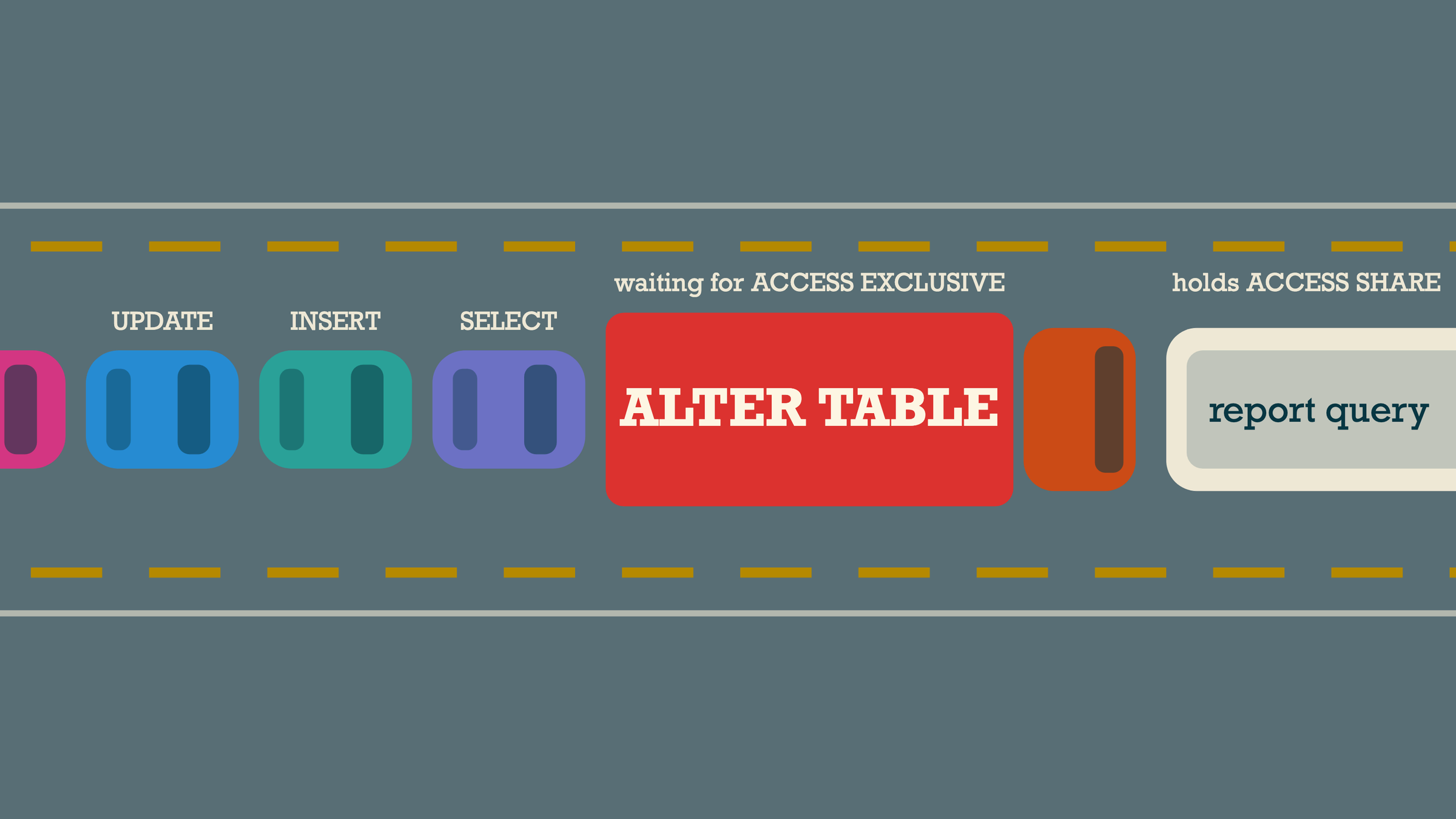
Now add the part that turns a brief lock into an outage. The documentation for pg_blocking_pids defines two ways one session blocks another: a hard block, where it holds a conflicting lock, and a soft block, where it is waiting for a conflicting lock and is ahead of the other session in the wait queue (system information functions). A waiting lock request is part of the queue that other sessions feel.
Put those together:
- A long-running report, or a transaction left idle by an application bug, holds
ACCESS SHAREonorders. - The migration requests
ACCESS EXCLUSIVEonorders. It conflicts with step 1, so it waits. - Every new
SELECT,INSERT, andUPDATEonordersrequests a lock that conflicts with the waitingACCESS EXCLUSIVE. They queue behind the migration, even though the migration holds nothing yet. - The table is effectively offline until the session in step 1 finishes, and then the migration runs in milliseconds.
Staging looked instant because nothing else held a lock on the table. The DDL itself was never the slow part; the wait was. This is why "use CONCURRENTLY" is incomplete advice. A metadata-only change such as adding a nullable column, or a column with a non-volatile default that does not rewrite the table (ALTER TABLE), still needs ACCESS EXCLUSIVE for a moment, and that moment can be preceded by an unbounded wait.
Locks last until the transaction ends
The documentation also notes that once acquired, a lock is normally held until the end of the transaction (explicit locking). If a migration framework wraps a fast ALTER TABLE and a slow backfill UPDATE in one transaction, the table stays exclusively locked for the whole backfill. Each step that needs a strong lock should be its own short transaction.
Diagnose the lock queue during an incident
When the table stalls, find the head of the queue before you cancel anything.
- List sessions waiting on locks and what blocks them:
-- Illustrative: who is waiting, and on whom. Run as a role that can see other sessions.
SELECT
  w.pid                         AS waiting_pid,
  w.wait_event_type,
  now() - w.query_start         AS waiting_for,
  left(w.query, 80)             AS waiting_query,
  pg_blocking_pids(w.pid)       AS blocked_by
FROM pg_stat_activity w
WHERE w.wait_event_type = 'Lock'
ORDER BY w.query_start;- Look up the blockers. A blocker in state
idle in transactionwith an oldxact_startis the classic cause: it holds locks while doing nothing (pg_stat_activity).
SELECT pid, state, now() - xact_start AS xact_age, left(query, 80) AS last_query
FROM pg_stat_activity
WHERE pid = ANY (pg_blocking_pids($1)); -- $1: the migration's pid- Decide which side to stop. Cancelling the migration (
pg_cancel_backendon its pid) releases the queue immediately and is always safe for a transactional DDL step. Terminating the blocker may be correct for an abandoned idle transaction and wrong for a real report or a batch job.
The documentation warns that frequent calls to pg_blocking_pids can affect performance because it needs exclusive access to the lock manager's shared state briefly (system information functions). Call it during diagnosis and before a migration attempt, not in a tight monitoring loop.
Fail fast with a lock timeout
The fix for the queue is to bound the wait. lock_timeout aborts any statement that waits longer than the given time to acquire a lock, and the limit applies separately to each lock acquisition attempt (client connection defaults). When it fires, the statement fails with canceling statement due to lock timeout, SQLSTATE 55P03 (lock_not_available) (pganalyze: L72; error codes).
Set it per migration transaction, not globally. The documentation explicitly says setting lock_timeout in postgresql.conf is not recommended because it affects all sessions.
BEGIN;
SET LOCAL lock_timeout = '2s';         -- bound the wait for the lock
SET LOCAL statement_timeout = '10s';   -- bound the work once it has the lock
ALTER TABLE orders ADD COLUMN gift_note text;
COMMIT;
Choose a lock timeout short enough that the queue behind the migration is tolerable for that table: the queue only exists while the migration waits, so the timeout is roughly the worst stall you are willing to cause per attempt. Start short on hot tables and tune it against the latency budget of the requests that read them.
Watch the interplay with statement_timeout. The documentation notes that if statement_timeout is nonzero, it is pointless to set lock_timeout to the same or a larger value, because the statement timeout always fires first. For a quick metadata change, keep both short. For a long scan that holds only a weak lock (a VALIDATE CONSTRAINT, below), use a short lock_timeout and a long or disabled statement_timeout.
A timeout turns an outage into a failed deploy step. That is louder and requires a retry policy, and it does not take the site down.
Retry with jitter, a deadline, and a blocker check
A lock timeout aborts the transaction, so a retry must start a new transaction. That makes the retry loop a job for the migration runner, not for SQL. The loop needs three properties:
- Jittered backoff so that retries from several deploy workers, or a retry that keeps landing just behind the same periodic job, do not collide again. Marc Brooker's analysis of backoff shows that exponential backoff alone still leaves clusters of calls, and recommends "full jitter": sleep a random time between zero and
min(cap, base * 2 ** attempt)(AWS Architecture Blog: exponential backoff and jitter). The same reasoning is covered in retry storms, backoff, and jitter. - A wall-clock deadline so the deploy fails clearly after a few minutes rather than retrying forever.
- A blocker lookup after each failed attempt, logged, so the failure report names the session that is in the way.
# Illustrative migration step runner using psycopg 3.
import logging
import random
import time

import psycopg
from psycopg import errors

log = logging.getLogger("migrate")

BLOCKERS_SQL = """
SELECT a.pid, a.state, now() - a.xact_start AS xact_age, left(a.query, 120) AS query
FROM pg_locks l
JOIN pg_stat_activity a ON a.pid = l.pid
WHERE l.relation = %s::regclass AND l.granted AND a.pid <> pg_backend_pid()
"""


def run_step(dsn: str, table: str, ddl: str,
             lock_timeout: str = "2s", statement_timeout: str = "30s",
             base: float = 0.5, cap: float = 15.0, deadline_s: float = 300.0) -> None:
    started = time.monotonic()
    attempt = 0
    with psycopg.connect(dsn, autocommit=True) as conn:
        while True:
            try:
                with conn.transaction():  # one short transaction per attempt
                    # set_config(..., true) is transaction-local, like SET LOCAL, and parameterized.
                    conn.execute("SELECT set_config('lock_timeout', %s, true)", (lock_timeout,))
                    conn.execute("SELECT set_config('statement_timeout', %s, true)", (statement_timeout,))
                    conn.execute(ddl)  # trusted, reviewed migration text only
                log.info("step applied after %d retries", attempt)
                return
            except errors.LockNotAvailable:
                holders = conn.execute(BLOCKERS_SQL, (table,)).fetchall()
                log.warning("lock timeout on %s; current holders: %s", table, holders)
                attempt += 1
                sleep_s = random.uniform(0, min(cap, base * 2 ** attempt))  # full jitter
                if time.monotonic() - started + sleep_s > deadline_s:
                    raise RuntimeError(f"gave up on {table} after {attempt} attempts") from None
                time.sleep(sleep_s)
A few details matter here. The ddl string comes from reviewed migration code, never from user input. Because run_step wraps each attempt in a transaction, it cannot run CREATE INDEX CONCURRENTLY or DROP INDEX CONCURRENTLY; those need the autocommit pattern in the next section. The blocker query lists sessions that currently hold a granted lock on the table, which is the useful list after a timeout; during an incident, the pg_blocking_pids query above shows the full chain. Do not catch QueryCanceled (SQLSTATE 57014, raised by statement_timeout) in the same retry branch: a step that ran out of statement time after taking the lock is a different problem, and retrying it repeats the stall.
If the same blocker appears on every attempt, retrying will not help. That is usually an idle-in-transaction session or a long batch job. idle_in_transaction_session_timeout terminates sessions that sit idle inside a transaction for longer than a set time, which the documentation notes is meant to stop idle sessions from holding locks unreasonably long (client connection defaults). Set it for application roles, not for interactive admin sessions that legitimately hold transactions open. Transactions held open across remote calls are a common source of this; see long transactions and external calls.
DDL forms that keep the long scan off the strong lock
A timeout bounds the wait. These forms bound how long the strong lock is held once acquired.
Build indexes concurrently
A normal CREATE INDEX blocks writes for the duration of the build. CREATE INDEX CONCURRENTLY takes SHARE UPDATE EXCLUSIVE, which does not block reads or writes (explicit locking), at the cost of two table scans across three transactions and waiting for existing transactions that modified the table (CREATE INDEX). Three rules come with it:
- It cannot run inside a transaction block. Run it on an autocommit connection, outside any migration-framework transaction wrapper.
- If it fails (a deadlock, a uniqueness violation, or a cancellation), it leaves an
INVALIDindex behind. That index is ignored by queries but still updated on every write. Drop it and retry, or useREINDEX INDEX CONCURRENTLY. - It waits for older transactions, so a long or idle transaction delays it too. A lock timeout can cancel it while it waits, which also leaves an invalid index.
-- Autocommit session; each statement is its own transaction.
SET lock_timeout = '2s';
SET statement_timeout = 0;   -- the build itself may take a long time
DROP INDEX CONCURRENTLY IF EXISTS orders_customer_placed_idx;  -- clear a prior invalid attempt
CREATE INDEX CONCURRENTLY orders_customer_placed_idx
  ON orders (customer_id, placed_at DESC);

-- Verify: no invalid indexes left on the table
SELECT indexrelid::regclass AS index_name
FROM pg_index
WHERE indrelid = 'orders'::regclass AND NOT indisvalid;
DROP INDEX CONCURRENTLY also cannot run in a transaction block (DROP INDEX), and indisvalid is false for an index that is possibly incomplete (pg_index). Only one concurrent index build can run per table at a time, and partitioned tables need each partition built separately (CREATE INDEX).
Add constraints as NOT VALID, then validate
Adding a check or foreign key constraint normally scans the whole table under the ALTER TABLE lock. With NOT VALID, that scan is skipped; the constraint is enforced for new and updated rows immediately, and existing rows are checked later by VALIDATE CONSTRAINT, which takes only SHARE UPDATE EXCLUSIVE (ALTER TABLE). ADD FOREIGN KEY takes SHARE ROW EXCLUSIVE on both the table and the referenced table, which blocks writes on both, so keep that step short.
-- Step 1: brief lock, no scan
BEGIN;
SET LOCAL lock_timeout = '2s';
ALTER TABLE orders
  ADD CONSTRAINT orders_customer_fk FOREIGN KEY (customer_id)
  REFERENCES customers (id) NOT VALID;
COMMIT;

-- Step 2: long scan under a weaker lock that allows reads and writes
BEGIN;
SET LOCAL lock_timeout = '2s';
SET LOCAL statement_timeout = 0;
ALTER TABLE orders VALIDATE CONSTRAINT orders_customer_fk;
COMMIT;
Make a column NOT NULL without a long exclusive scan
SET NOT NULL normally scans the whole table under ACCESS EXCLUSIVE. The documentation says the scan is skipped if a valid CHECK constraint already proves no nulls exist (ALTER TABLE). For a column such as orders.customer_id that should never be null: backfill any null rows in small batches first (VALIDATE fails if one remains), add CHECK (customer_id IS NOT NULL) NOT VALID, validate it, run SET NOT NULL (brief lock, no scan), then drop the check constraint. Each step is short and runs with its own lock timeout.
Avoid rewrites during traffic
Some changes rewrite the whole table under ACCESS EXCLUSIVE: adding a column with a volatile default, many column type changes, and others listed in the ALTER TABLE notes. The documentation also warns rewrites can need temporary disk space up to roughly twice the table size and are not MVCC-safe (ALTER TABLE). For a large, busy table, replace a rewrite with an expand-and-contract sequence: add a new column, backfill in small batches, switch reads and writes, then drop the old column.
Trade-offs
- Failing the migration is louder than waiting. Deploys need to handle a failed step and resume, and someone has to look at the blocker report. In return, the site stays up.
- Concurrent index builds are slower than normal builds and can leave an invalid index behind when they fail. The runner must clean up before retrying.
- NOT VALID plus VALIDATE is more steps and more migration files. It avoids a long exclusive lock and is worth it for any table that serves traffic.
- Jittered retries with a deadline can still fail if a blocker never goes away. That is the correct outcome: it surfaces a long transaction that is a production problem in its own right.
- A maintenance window is simpler when you truly have one. If traffic can be stopped, a plain
ALTER TABLEwith no retries is fine. Most services do not have that window, and staging will not tell you whether you need one.
Checklist before the next migration
- Every migration step runs in its own short transaction with
SET LOCAL lock_timeout. lock_timeoutis shorter thanstatement_timeoutwherever both are set.- The runner retries
lock_not_availablewith full jitter, a wall-clock deadline, and a logged blocker list. - Index builds and drops use
CONCURRENTLY, outside any transaction wrapper, and the runner drops an invalid index before retrying. - Constraints are added
NOT VALIDand validated in a separate step. - No table rewrites on hot tables; use expand and contract.
- Application roles have
idle_in_transaction_session_timeoutset. - During an incident, check
pg_blocking_pidsbefore cancelling anything, and cancel the migration first.
If the stall exhausted your connection pool, API slow under load covers what that looks like from the application side. New indexes for keyset pagination are a common reason to run this procedure.
Sources
- PostgreSQL 18: explicit locking: which commands take
ACCESS EXCLUSIVEandSHARE UPDATE EXCLUSIVE, conflict tables, locks held until transaction end. - PostgreSQL 18: system information functions:
pg_blocking_pids, hard and soft blocks, the wait queue, and the performance note. - PostgreSQL 18: client connection defaults:
lock_timeout,statement_timeout,idle_in_transaction_session_timeout. - PostgreSQL 18: ALTER TABLE: default lock levels,
NOT VALIDandVALIDATE CONSTRAINT, foreign key lock level,SET NOT NULLscan skip, rewrite conditions. - PostgreSQL 18: CREATE INDEX: concurrent builds, transaction block restriction, invalid indexes on failure.
- PostgreSQL 18: DROP INDEX:
DROP INDEX CONCURRENTLYrestrictions. - PostgreSQL 18: pg_index:
indisvalid. - PostgreSQL 18: pg_stat_activity:
state,xact_start,wait_event_type. - PostgreSQL 18: error codes and pganalyze: L72: SQLSTATE
55P03for lock timeouts. - Marc Brooker, AWS Architecture Blog: exponential backoff and jitter: clustering without jitter, the full jitter formula.
Written by
Azeem Subhani
Senior Full-Stack & AI Application Engineer
I build SaaS, booking, payment, real-time, and AI-enabled web platforms with React, Next.js, Node.js, NestJS, Django, PostgreSQL, and AWS. My work includes Stripe payment systems, white-label booking flows, real-time collaboration, RAG workflows, and developer automation.