Serverless Database Connection Exhaustion: Fix the Fleet Arithmetic
Serverless instances times pool size can exceed Postgres max_connections. Size pools per platform, add a pooler, and know what transaction mode breaks.
Azeem Subhani · · 10 min read
Traffic spikes, the serverless functions scale out as designed, and then requests start timing out. Logs show connection errors from Postgres refusing new clients, or the ORM giving up while waiting for a pool slot. The database dashboard shows CPU well below its ceiling. This is serverless database connection exhaustion: the fleet of function instances has opened more sessions than the database will accept, long before the database ran out of compute.
The tempting fixes are to raise the function timeout, raise max_connections, or copy a connection-string flag from a forum thread. A longer timeout does not create sessions. A higher connection limit spends database memory on sessions and can slow every query. A flag you do not understand can silently break features your code relies on. This post does the arithmetic first, then picks the fix that matches it.
The arithmetic behind serverless database connection exhaustion
On a traditional server, you run a handful of long-lived processes, each with a pool. Total connections are processes times pool size, and both numbers change only when you deploy or scale on purpose.
Serverless breaks the first number loose. AWS Lambda provisions a separate execution environment for each concurrent request, and an environment that is handling a request is busy and cannot process another one (AWS Lambda, understanding concurrency). The same page gives the concurrency formula: average requests per second times average duration in seconds. By default an account can run 1,000 concurrent executions per Region, shared across functions.
Each warm environment keeps whatever it created outside the handler, including a connection pool. So the number you must compute is:
peak connections ≈ Σ over every function and service that talks to the DB:
                     (peak concurrent instances) × (connections each instance holds)
                   + connections held by instances from the previous deploy that are still warm
                   + migrations, cron jobs, admin tools, replicas' needs
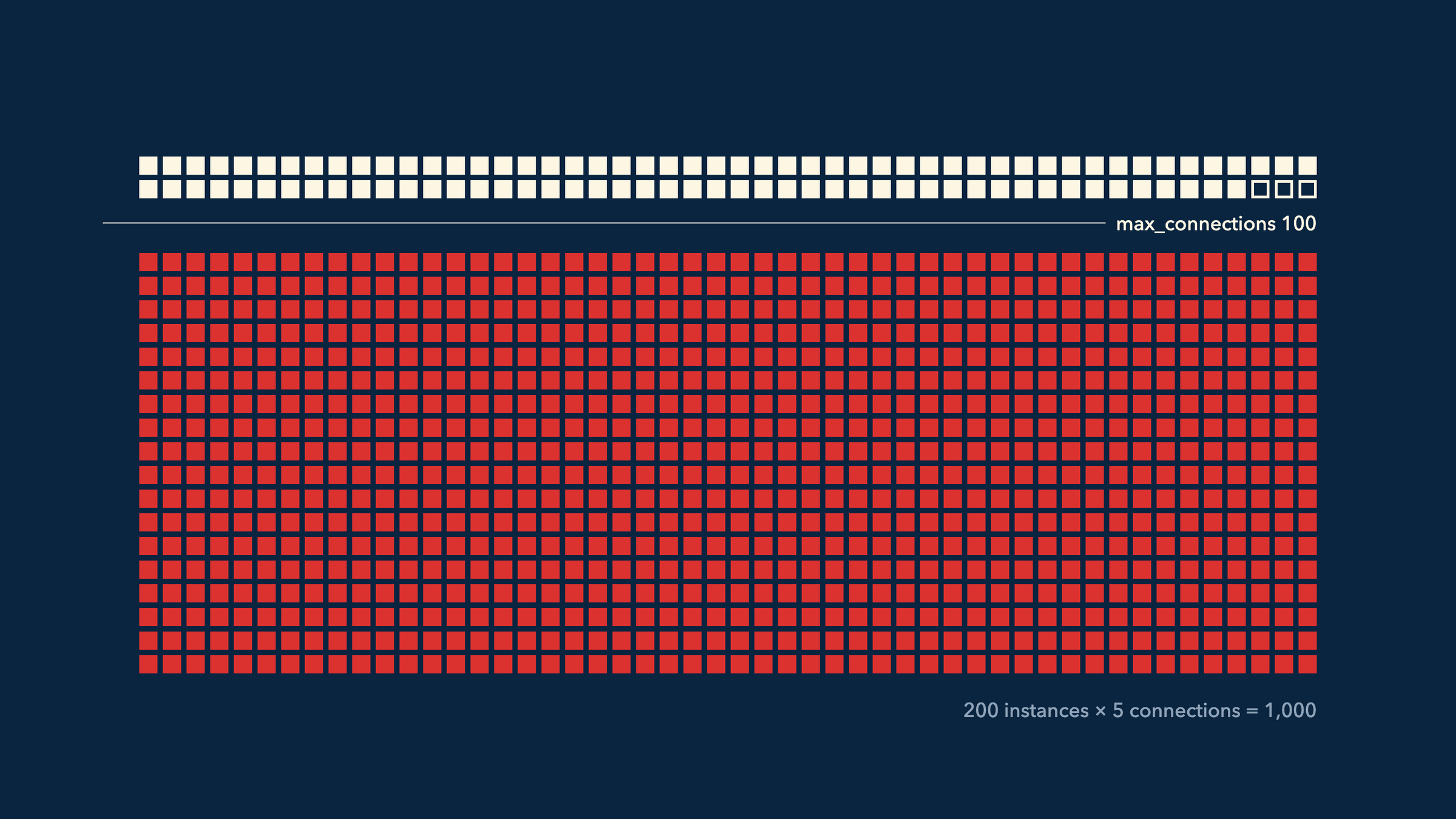
Compare that against the database's limit. Postgres max_connections defaults to 100, can only be changed at server start, and reserves 3 slots for superusers by default through superuser_reserved_connections (PostgreSQL connection settings). Managed providers often set their own value based on instance size, so read the real setting with SHOW max_connections; rather than assuming.
A hypothetical, to make the shape concrete: a function peaks at 200 concurrent executions, and each instance's ORM pool opens up to 5 connections. That fleet can ask for 1,000 sessions. A pool size of 5 is modest on one server. Across 200 ephemeral instances it is ten times the default limit.
The arithmetic also explains why raising the function timeout does nothing. Requests time out waiting for a connection that cannot exist, because the database will not accept it. Waiting longer just means each failed request costs more compute before it fails.
Why one pool size does not fit every platform
Pool sizing advice for serverless looks contradictory until you notice that platforms differ in how many requests one instance handles at a time.
One request per instance
On Lambda's default model (as documented in October 2026), one environment handles one request at a time. A pool bigger than the number of connections a single request needs at once is wasted: the extra connections sit idle, counted against the database limit, while their instance waits for its next request. Prisma's v6 documentation reflects this. It says that without an external pooler you should start with a pool size (connection_limit) of 1, and notes the default is num_physical_cpus * 2 + 1 (Prisma v6, database connections). The current Prisma docs (checked October 2026) describe pool configuration as specific to the driver adapter and advise starting small when not using a pooler (Prisma, database connections). Check which version you run before copying a setting.
Many requests per instance
As of October 2026, Vercel's Fluid compute lets several concurrent requests share one instance and its global state. Vercel's guidance for that model is the opposite: avoid a maximum pool size of 1, because it harms concurrency, keep the minimum at 1, and use a short idle timeout such as 5 seconds (Vercel, connection pooling with functions).
The same guide names a second failure: when a function instance is suspended, idle timeouts do not run, so idle connections stay open until the VM shuts down or the database closes them. That creates phantom usage, particularly after deployments or traffic spikes. Vercel's attachDatabasePool helper from @vercel/functions closes idle connections before suspension.
// Illustrative: one pool per instance on Vercel Fluid compute (Node.js runtime).
import { Pool } from "pg";
import { attachDatabasePool } from "@vercel/functions";

// Created at module scope so concurrent requests in this instance share it.
export const pool = new Pool({
  connectionString: process.env.DATABASE_URL, // point at a pooler, not the primary
  max: 5,                    // per instance; multiply by expected instances
  min: 1,
  idleTimeoutMillis: 5_000,  // release idle connections quickly
  connectionTimeoutMillis: 2_000, // fail fast instead of waiting forever
});

// Lets the platform close idle clients before suspending the instance.
attachDatabasePool(pool);
On Lambda, the equivalent is a module-scope pool with max: 1 (or the smallest number a single request needs), and a database-side or pooler-side idle timeout so that frozen environments eventually give their sessions back.
Read connection count next to CPU
Diagnosis is mostly a matter of graphing the right two lines together.
- Plot database connections and database CPU on the same chart. If connections hit the ceiling while CPU stays moderate, the limit is sessions, not compute.
- Plot function concurrency on the same time axis. For Lambda, the
ConcurrentExecutionsCloudWatch metric shows concurrent invocations per function (AWS Lambda, reserved concurrency). Connection count rising in step with concurrency confirms the multiplication. - Ask Postgres who holds the sessions. Set a distinct
application_namein each service's connection string, then group:
-- Illustrative: who is holding sessions, and are they doing anything?
SELECT application_name,
       usename,
       state,
       count(*)                  AS sessions,
       max(now() - state_change) AS longest_in_state
FROM pg_stat_activity
WHERE backend_type = 'client backend'
GROUP BY application_name, usename, state
ORDER BY sessions DESC;
Large counts of idle sessions from one function mean warm instances parked on connections they are not using. Postgres documents idle as waiting for a new client command, distinct from idle in transaction (PostgreSQL monitoring docs). Many idle in transaction sessions point at a different bug, transactions held open across slow work, covered in the long transactions post.
- Check for deploy overlap. If exhaustion lines up with deployments, the old version's warm instances are still holding sessions while the new version opens its own.
Put a pooler in front of the database
A pooler accepts many cheap client connections and multiplexes them onto a small number of real database sessions. It is the fix that changes the arithmetic: the database now sees the pooler's server-side pool, not the fleet.
PgBouncer and its three modes
PgBouncer offers session, transaction, and statement pooling (PgBouncer features). Session mode assigns a server connection for as long as the client stays connected, which does nothing for idle serverless instances. Transaction mode assigns a server connection only for the duration of a transaction and returns it to the pool afterward. That is the mode that helps serverless fleets. Statement mode goes further and disallows multi-statement transactions.
; Illustrative pgbouncer.ini for a serverless fleet
[databases]
app = host=db.internal port=5432 dbname=app

[pgbouncer]
listen_port = 6432
pool_mode = transaction
; many cheap client connections from functions
max_client_conn = 2000
; real Postgres sessions per user/database pair
default_pool_size = 20
max_prepared_statements = 200
auth_type = scram-sha-256
auth_file = /etc/pgbouncer/userlist.txt
The default pool_mode is session, default_pool_size defaults to 20, and max_client_conn defaults to 100 (PgBouncer configuration). Raising max_client_conn may require raising the OS file descriptor limit, as the same page explains.
What transaction pooling takes away
Because consecutive transactions from one client can land on different server sessions, anything that relies on session state breaks or behaves unpredictably. PgBouncer lists the incompatible features in transaction mode (PgBouncer features):
SETandRESETof session settingsLISTENWITH HOLDcursors- SQL-level
PREPAREandDEALLOCATE - Session-level advisory locks
LOAD- Temporary tables with
PRESERVE ROWSorDELETE ROWS
Protocol-level prepared statements, the kind most drivers use under the hood, are a separate case. PgBouncer added support for them in transaction mode in 1.21.0 with the feature disabled by default, and 1.24.0 enabled it by default with max_prepared_statements set to 200 (PgBouncer changelog). That tracking does not cover SQL-level PREPARE and EXECUTE (PgBouncer configuration). On an older PgBouncer, or with a driver that names its prepared statements in ways the pooler cannot track, you need to turn prepared statements off on the client. Prisma's docs describe adding ?pgbouncer=true to the connection string when connecting through PgBouncer, and using a separate direct URL for CLI commands such as migrations (Prisma, database connections).
Practical replacements behind PgBouncer: use SET LOCAL inside a transaction instead of SET, set per-role defaults with ALTER ROLE ... SET so every session starts correct, use transaction-scoped advisory locks (pg_advisory_xact_lock) instead of session-scoped ones, and run migrations and LISTEN consumers against a direct connection. These replacements are specific to PgBouncer; RDS Proxy has its own rules, below.
RDS Proxy and pinning
On AWS, RDS Proxy pools and multiplexes connections, queues or throttles clients it cannot serve immediately, and sheds load when requests exceed the limits you configure (Amazon RDS Proxy). It reuses a database connection at the end of each transaction unless the session is pinned. For PostgreSQL, the documented pinning triggers include SET commands, SQL PREPARE/EXECUTE/DEALLOCATE, temporary tables, sequences, or views, declaring cursors, LISTEN, loading a library module, nextval and setval, and session-level advisory locks; transaction-level advisory locks do not pin (RDS Proxy pinning). A pinned session holds its database connection until the client disconnects, which puts you back on the original arithmetic. Watch the DatabaseConnectionsCurrentlySessionPinned CloudWatch metric, and move repeated SET statements into the proxy's initialization query.
Other ways to keep sessions under the limit
A very small pool per instance
On one-request-per-instance platforms, set the pool to the number of connections a single request needs at once, usually 1. Combine it with an acquisition timeout so a request fails fast instead of consuming its whole function timeout. This reduces connections but does not bound them; instance count is still the multiplier.
A driver that does not hold a session
HTTP-based drivers send each query or non-interactive transaction as a request and hold no long-lived session between invocations. Neon's serverless driver, for example, runs single queries and non-interactive transactions over HTTP, and requires its WebSocket Pool or Client for interactive transactions and session features (Neon serverless driver). This fits endpoints that issue a few independent queries. It does not fit code that reads, decides in application logic, then writes inside one transaction.
Bound function concurrency
If the database can usefully serve a known number of sessions, cap the fleet so the product stays under it. Lambda's reserved concurrency sets both a maximum and a minimum for a function, and AWS documents it as a way to avoid overwhelming downstream resources such as database connections (AWS Lambda, reserved concurrency).
# Illustrative: cap this function at 40 concurrent executions.
# With max: 1 per instance, it can hold at most 40 DB sessions.
aws lambda put-function-concurrency \
  --function-name orders-api \
  --reserved-concurrent-executions 40
Requests above the cap are throttled. For synchronous callers, that means errors they must retry with backoff (see the retry storm post); for queue-driven functions, it means a backlog that drains more slowly.
Cache what does not need a connection
Pages and API responses that do not change per request can be served from a CDN or framework cache and never open a connection. Be deliberate about what you cache: per-user data in a shared cache is a correctness and privacy bug, described in the Next.js stale data post.
Trade-offs to weigh before you pick a fix
- A pooler adds a network hop and a component that can fail or become the bottleneck. Run it highly available, monitor its own client wait time, and size its server pool for the database's useful concurrency.
- Transaction pooling breaks session features. Audit your code and ORM for the list above before enabling it, or you will see intermittent bugs that only appear under load, when transactions start landing on different sessions.
- Limiting concurrency protects the database and moves the queue to the platform. Users see throttles or slower queue processing instead of database errors.
- A cache avoids connections and serves stale data. Decide per route how stale is acceptable.
- Raising
max_connectionscosts shared memory for every slot, since Postgres sizes certain resources from that setting (PostgreSQL connection settings), and requires a restart. More concurrent sessions than the database can run in parallel adds contention; the HikariCP pool-sizing note makes this argument for a single application, and it applies the same way to a fleet (HikariCP, About Pool Sizing). For how pool wait and database contention interact, see the connection pool post.
How to verify the fix
- Database connections plateau while function concurrency keeps rising during a load test, because the pooler or cap now bounds sessions.
- Errors for refused connections disappear from function logs, and pool acquisition timeouts stay rare.
- Pooler client wait stays low. If it rises, the pooler's server pool is now the queue; check whether the database has spare capacity before raising it.
- Pinned connections stay near zero on RDS Proxy.
- Deploys no longer cause a connection spike, because idle connections are released promptly.
Checklist for this week
- Write down the connection formula for your system with real numbers: peak concurrency per function, connections per instance, other clients, and the actual
max_connections. - Set
application_nameper service sopg_stat_activitytells you who holds sessions. - Match pool size to your platform: 1 per instance for one-request-per-instance, a small pool with a short idle timeout and
attachDatabasePoolon Vercel Fluid. - Put PgBouncer in transaction mode or RDS Proxy in front of the primary, after auditing for session features.
- Keep a direct connection for migrations and
LISTENconsumers. - Cap function concurrency where the database cannot absorb the fleet.
- Add acquisition timeouts so failures are fast and visible.
Sources
- AWS Lambda, understanding concurrency: one execution environment per concurrent request, the concurrency formula, the default account limit of 1,000.
- AWS Lambda, configuring reserved concurrency: reserved concurrency as a cap to protect downstream resources, the ConcurrentExecutions metric, the CLI command.
- PostgreSQL, connection settings: max_connections default, restart requirement, reserved slots, shared memory sizing.
- PostgreSQL, cumulative statistics system: pg_stat_activity states.
- PgBouncer features: pooling modes and features incompatible with transaction pooling.
- PgBouncer configuration: pool_mode, default_pool_size, max_client_conn, and max_prepared_statements behavior.
- PgBouncer changelog: prepared statement support in 1.21.0 and the default change in 1.24.0.
- Amazon RDS Proxy: pooling, queuing, throttling, and load shedding.
- Avoiding pinning an RDS Proxy: PostgreSQL pinning conditions and the pinned-connections metric.
- Prisma v6, database connections: default pool size formula and connection_limit of 1 for serverless.
- Prisma, database connections: adapter-specific pool settings, pgbouncer flag, direct URL for CLI.
- Vercel, connection pooling with functions: Fluid compute pool guidance, suspension leaks, attachDatabasePool.
- Neon serverless driver: HTTP versus WebSocket modes and which supports interactive transactions.
- HikariCP wiki, About Pool Sizing: why more connections than the database can run in parallel hurts.
Written by
Azeem Subhani
Senior Full-Stack & AI Application Engineer
I build SaaS, booking, payment, real-time, and AI-enabled web platforms with React, Next.js, Node.js, NestJS, Django, PostgreSQL, and AWS. My work includes Stripe payment systems, white-label booking flows, real-time collaboration, RAG workflows, and developer automation.